Keeping our end customers informed is quite necessary. And many times we face scenarios wherein we need to include the tracking information, order details, login URLs, or personalized URL in SMSs or Messages.
We cannot use the full URL as it might exhaust the character limit of the SMS and you will end up consuming multiple super messages for 1 SMS send. (See the super messages consumption document for better understanding – https://www.salesforce.com/products/marketing-cloud/sfmc/sms-ratio-updates/)
We can utilize ampscript in the SMS to shorten the URL using Bitly services. However, a Bitly account is required in order to complete the setup.
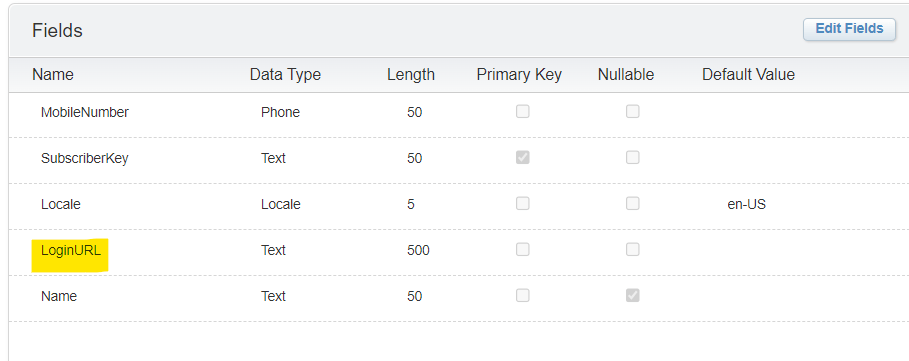
Scenario – We need to send an SMS to the audience in the data extension and give them an option to log-in. We have a Mobile Audience data extension wherein we have the LoginURL saved in the LoginURL column which is personalized for each record.
Our task – Create an SMS in mobile connect with shortened LoginURL.
Data Extension columns –
- Go to Mobile Connect – Create Message.
- Select the type of message you want to create.
- Type in the Message name and select the long/short code.
- Select the sendable data extension and click next.
- Add this script to your message –
%%[

SET @endpoint = "https://api-ssl.bitly.com/v4/shorten"
SET @contentType = "application/json"
SET @bitlyToken = "GettheBITLYtokenfromBITLYACCOUNT"
SET @additionalHeaderName = "Authorization"
SET @LoginURL = [LoginURL]
SET @additionalHeaderValue = CONCAT("Bearer ", @bitlyToken)

SET @payload = CONCAT('{"group_guid":"BITLYgroupIDhere","domain":"bit.ly","long_Url":"',@LoginURL,'"}')

SET @Request = HTTPPost(@endpoint, @contentType, @payload, @Response, @additionalHeaderName, @additionalHeaderValue)

]%%
{{.datasource response type=variable source=@response}}
   {{.data}}
      {"target":"@response"}
   {{/data}}
  %%[
   VAR @shortLink
   SET @shortLink = TreatAsContent('{{link}}')
  ]%%
{{/datasource}}
Hi There! Please login to your account by clicking on the link - %%=v(@shortLink)=%%- Once done. Click next and save your SMS. Your SMS is now ready for send and it will deliver the shortened URL.
Note – Update – bitlyToken, group_guid as per your bitly account. You can find this by following bitly API support document – https://dev.bitly.com/api-reference/#createBitlink

 Simplifying Marketing Cloud Challenges
Leave a comment