Every now and then we get requirements to create auto-suppression lists. Most common examples are hard-bounce auto suppression, spam-complaint auto suppression etc.
The general process to update an auto suppression list is to create an automation with 4 activities –
Activity 1: Query Activity to populate the staging data extension
Activity 2: Data Extract Activity to extract the data
Activity 3: File Transfer Activity to transfer the file to SFTP
Activity 4: Import into the auto – suppression list
However, we can replace all 4 activities with just 1 query activity. Benefits –
1. You don’t have to configure 4 activities in order to update the auto – suppression list.
2. Saves the configuration time and runs efficiently.
3. You can deploy it using package manager to other business units.
How do we do it?
Follow below steps –
Step 1 – Create an auto suppression list
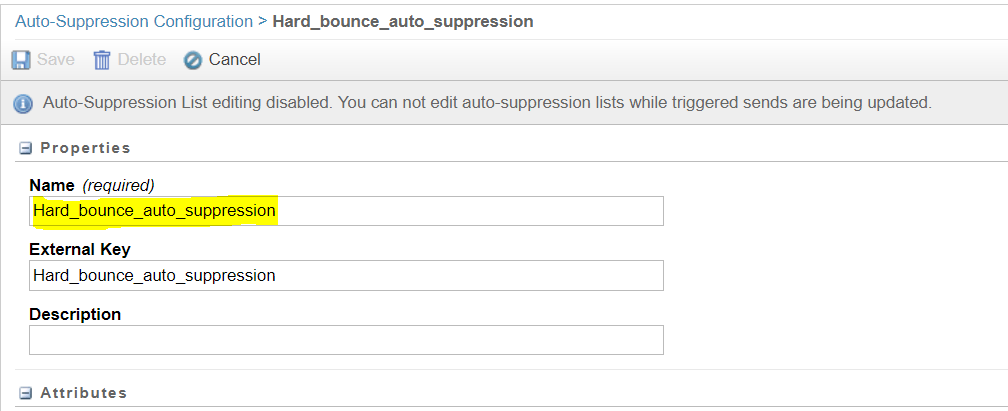
Step 2 – Create a sample data extension (Don’t put too much effort because this DE will be replaced with the auto-suppression list by Step 4 – script)
Step 3 – Create an SQL query to update the DE created in step 2. And make a note of object ID. You can find the query object ID in the URL (36-alphanumeric characters). See example –
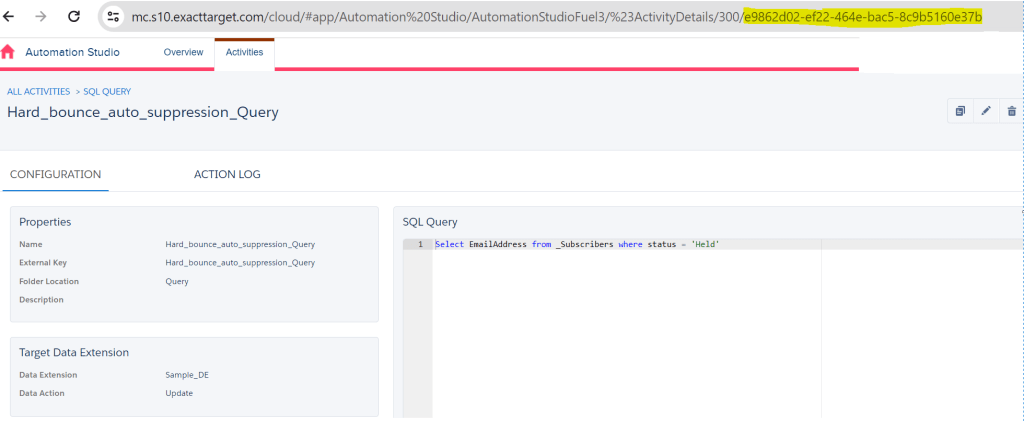
Step 4 – Run below SSJS script on a cloud page (this will replace the target audience of the step 3 -query to the auto suppression list created in step 1 — Update the query syntax, customerkey, objectID, Target customerkey and Name with your query/auto-suppression list/DE details)
<script language="javascript" runat="server">Platform.Load('Core', '1');var prox = new Script.Util.WSProxy();var queryStr = ''; queryStr += 'SELECT DISTINCT'; queryStr += '\ns.Emailaddress AS [Email Address]'; queryStr += '\nFROM ENT._Bounce b'; queryStr += '\nINNER JOIN ENT._Subscribers AS s'; queryStr += '\nON b.SubscriberKey = s.SubscriberKey'; queryStr += '\nWHERE b.BounceCategoryID = 1'; var queryDef = { CustomerKey: 'Hard_bounce_auto_suppression_Query', ObjectID: 'e9862d02-ef22-464e-bac5-8c9b5160e37b', QueryText: queryStr, TargetType: 'DE', TargetUpdateType: 'Update', DataExtensionTarget: { CustomerKey: 'Hard_bounce_auto_suppression', Name: 'Hard_bounce_auto_suppression' } };var updateQuery = prox.updateItem('QueryDefinition', queryDef);Write('result: ' + Stringify(updateQuery))</script>
Expected result of the above script –
result: {"Status":"OK","RequestID":"efa1aa68-c6b1-4487-9bae-2d20dd24206c","Results":[{"Object":{"QueryText":"SELECT DISTINCT\ns.Emailaddress AS [Email Address]\nFROM _Bounce b\nINNER JOIN _Subscribers AS s\nON b.SubscriberKey = s.SubscriberKey\nWHERE b.BounceCategoryID = 1","TargetType":"DE","DataExtensionTarget":{"Name":"Hard_bounce_auto_suppression","Description":null,"Keyword":null,"Client":null,"PartnerKey":null,"PartnerProperties":null,"CreatedDate":"0001-01-01T00:00:00.000","ModifiedDate":null,"ID":0,"ObjectID":null,"CustomerKey":"Hard_bounce_auto_suppression","Owner":null,"CorrelationID":null,"ObjectState":null,"IsPlatformObject":false},"TargetUpdateType":"Update","FileSpec":null,"FileType":null,"Status":null,"CategoryID":0,"InteractionObjectID":null,"Name":null,"Description":null,"Keyword":null,"Client":null,"PartnerKey":null,"PartnerProperties":null,"CreatedDate":"0001-01-01T00:00:00.000","ModifiedDate":null,"ID":0,"ObjectID":"e9862d02-ef22-464e-bac5-8c9b5160e37b","CustomerKey":"Hard_bounce_auto_suppression_Query","Owner":null,"CorrelationID":null,"ObjectState":null,"IsPlatformObject":false},"UpdateResults":null,"ParentPropertyName":null,"StatusCode":"OK","StatusMessage":"QueryDefinition updated","OrdinalID":0,"ErrorCode":0,"RequestID":null,"ConversationID":null,"OverallStatusCode":null,"RequestType":"Synchronous","ResultType":null,"ResultDetailXML":null}]}
Step 5 – After successful run of the script. Check the query that you created in Step 3 under automation studio – you will observe that the target data extension has now changed to the auto-suppression list name that was created in Step 1.

Now, you can use this query to update the data in an auto – suppression list directly from an automation.
-
-
Once the Step 4 script runs successfully then it will update the query definition (created in Step-3) and target data extension to the auto-suppression list and you can use this query to run using an automation.
Step-1 to Step-5 is just to update the target data extension of the query to auto-suppression list (because you cannot select auto-suppression list as target data extension from the interface)LikeLike
-
-
System.Reflection.TargetInvocationException: Exception has been thrown by the target of an invocation. – from mscorlib –> — inner exception 1— ExactTarget.OMM.FunctionExecutionException: WSProxy object is not valid in sendable content. This function is only allowed in non-sendable content.
LikeLike
-
Just to confirm that you have added this script on a cloud page and not in an email content?
LikeLike
-
-
it worked, when i used the code resource as the landing page instead of landing page
LikeLike
-
Glad to know it worked! Thanks for sharing.
LikeLike
-


 Simplifying Marketing Cloud Challenges
Leave a comment